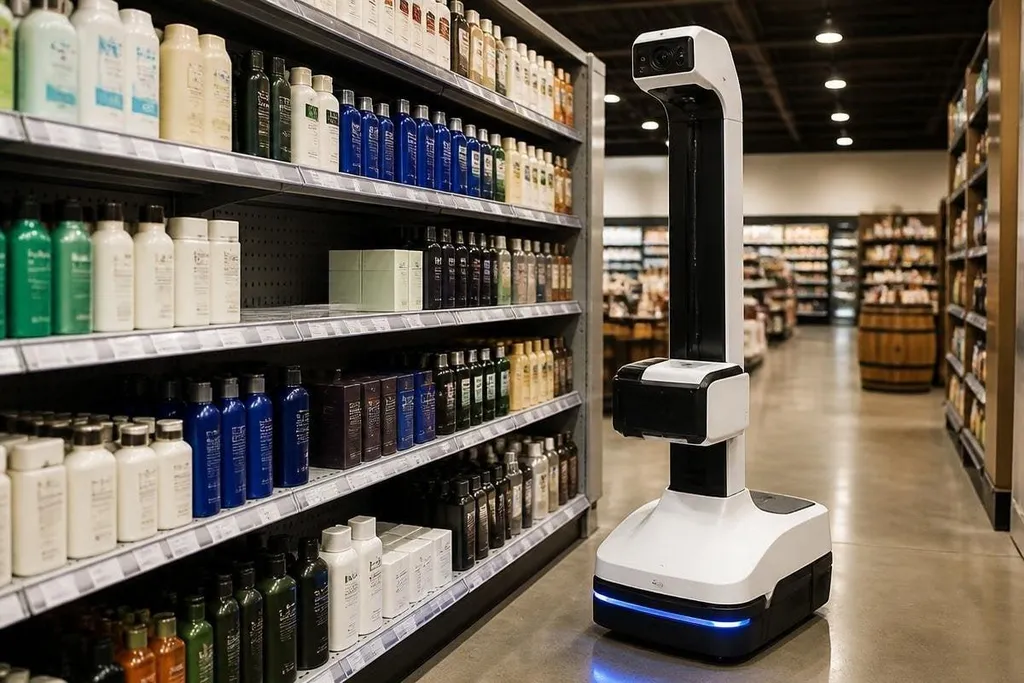
A shelf can look full from a distance while one product slot sits empty. Robots find that gap by combining camera images with product data, shelf maps, and checks made during each store visit.
If you manage retail automation, the useful question is how the robot turns an image into a stock alert. The answer starts with the shelf plan, then moves through image checks, product matching, and human review.
Quick read
- Cameras compare shelf slots with the store’s product list.
- Barcodes, package shape, color, and position help identify each item.
- A human may review low-confidence alerts before staff refill a shelf.
The robot starts with a shelf map
The system needs to know what should be in each shelf position. That plan can include the product’s stock keeping unit, or SKU, its shelf location, the number of facing positions, and the height of the shelf.
A facing is one product position visible to a shopper. If the plan says four facings should hold the same item and the camera sees two, the software can flag a possible stock problem. The alert still needs context because a product may have moved to another shelf or been placed behind a larger package.
A mobile robot may use a camera mounted on its base, while a fixed camera can sit above the aisle. Some systems use both. A mobile robot can scan more shelves with fewer cameras, while a fixed system can watch one area more often. The choice depends on store layout, power access, and the cost of moving through customer areas.
Cameras look for gaps and product details
A 2D camera records color and shape. Image software then checks the shelf area for empty space, package edges, labels, and the position of each item. A 3D camera adds depth, which helps separate products placed in front of one another.
The system compares what it sees with stored product images and shelf rules. Barcode reading can confirm an item when the label faces the camera. When a barcode is hidden, the software may use package shape, color, text, and location instead.
That location check matters. Two products can share similar packaging, but they may belong in different shelf slots. A match becomes more useful when the robot checks the package against the expected SKU and the mapped shelf position at the same time.
It also needs to tell an empty slot from a blocked view. A shopper, price sign, loose package, or shelf edge can hide part of the product area. A single image may create a false alert, so the system can compare nearby views or send the image for a staff check.
An empty-slot claim needs a record of the camera, store, scan route, and staff checks behind it. Shelf-scanning robot reports can tie those details to the alert, so you can see whether the system works beyond a short demo.
Other sensors add context
Cameras do most of the visible work, but other sensors can support the check. Weight sensors under a shelf can show that an item is missing even when the camera view is poor. Radio-frequency identification, or RFID, can identify tagged items without a clear barcode view, though it needs suitable tags and readers.
Movement affects the result, too. If its base stops too far from the shelf, the camera may miss small labels. If the robot moves while the image is blurred, the software may lower its confidence.
A scan record should include the shelf location, image time, detected SKU, and confidence score so staff can check the alert later. That record also gives the store a way to compare repeated scans from the same shelf.
A stock alert still doesn't prove that the store has no units left. Products may sit in a back room, on a trolley, or in a nearby display. The robot reports a shelf condition. Inventory software and staff checks are needed to confirm the wider stock position.
A practical check before you buy
Use this list to judge a shelf-scanning system before a trial:
- Shelf data: Check that the system can load SKUs, shelf positions, and expected facings.
- Image records: Ask to see the shelf image attached to each alert.
- Low-confidence cases: Confirm that staff can review and correct uncertain matches.
- Store conditions: Test glare, shoppers, price labels, dark corners, and blocked views.
- Inventory links: Check how alerts reach the refill or stock control system.
- Audit trail: Make sure each alert stores its time, location, detected item, and review result.
I'd choose a system that shows its uncertain calls instead of hiding them behind a clean dashboard. The open question is how well the robot performs across changing packaging, crowded aisles, and shelves that rarely look the same twice.